More readable names. Less competition for space.
The Queue Board remains the base. This pass raises player names from 32 to 42 pixels on the 1080p canvas. Long-distance mode uses 48 pixels and at most three games per view. The board adds pages or uses another screen before shrinking names.
Each game's first two positions remain visible while later entries page. The top call strip is removed, giving the queues 94 more pixels than the previous default. A fixed area beside the QR holds calls, announcements, and games outside the current view. Games already visible in the main panels are never repeated in the directory.
| Change | Player benefit | Tradeoff |
|---|---|---|
| 42 or 48 px names | More readable than the first concept's 32 px names. Essential game terms remain separate from player rows. | Fewer entries fit. Long-distance mode can create more game groups. |
| Measured name wrapping | Long public aliases wrap at the selected type size, without ellipsis or a smaller font. Similar sample aliases have explicit public qualifiers. | Two-line names consume more height, so pages contain fewer entries. Public qualifiers require a real alias policy before production. |
| Only off-screen games in the directory | Show a “Group 2” or “TV 3” destination without repeating the main cards. With no calls, the directory also shows list/seat counts. | One call shares space with a compact directory that omits counts. Two or three calls use the full support area, with a short location cue for the other games. |
| Fixed lower support area | Calls and announcements occupy the same 224 px footer beside the QR. Calls do not move the cards, resize queues or alter their page capacity. | When all games are visible and there is no message, that area stays quiet. Larger call volumes need a separate paging policy. |
| More list columns on quieter screens | With one or two assigned games, spare horizontal space shows more positions from those queues at the same name size. | Read each numbered list down and then across. The header and footer belong to the entire game panel. |
| Visible capacity cost | The review reports top-position revisit time and the slowest deep-page cycle at a proposed 15-second dwell. | One TV cannot show eight deep queues continuously at large type. A long cycle is a prompt to add coverage, not claim that pagination solved everything. |
These are design proposals. The 15-second dwell and 90-second review warning are starting points for room testing, not industry standards or approved production settings. Cycle estimates exclude new-call holds, manual pauses and connection loss.
A game should be easy to find again.
- One TV: game groups alternate every 15 seconds when playback is enabled. Each game has its own saved page cursor. Returning to a group advances its deep entries instead of restarting at the first page. Games outside the current view appear in the directory, with their next group or other TV location. Two or three active calls temporarily replace that detailed directory with a location summary.
- Several TVs: the sample assigns contiguous game groups to named TVs and keeps those assignments fixed. Choose another TV in the review to inspect it. Production assignments should be explicit and shared by every device, with room-specific screen names such as “Podium” and “Back wall.”
- Deep queues: first and second positions stay in the first list column on every page. The footer states the actual visible rank ranges and page count. Shorter queues cycle independently. Real live positions must come from the server, not from the row's position in the UI.
- Calls: three simultaneous calls are demonstrated, including a game outside the main panels. Calls use full-width rows in the fixed lower support area on every TV, including calls for games outside the main view. The supplied long aliases fit at the same 42 or 48 px size as queue names. The queue panels do not move or repaginate when a call appears. In that scenario, playback holds for 20 seconds before resuming. “Next view” deliberately skips that hold for review. Production holds are triggered by a new call, with no automatic seat or expiry promise.
- Connection loss: keep cached names and the last successful update time; stop rotation and remove active call/seat-availability claims. A device that has never loaded data needs a separate “Waiting for room information” fallback.
- Returning from another view: preserve per-game page progress. “Previous view” in this review restores the earlier group and its page cursors. These review controls are outside the TV picture.
What the screen-count comparison is testing
At four TVs with eight games, each screen owns two games. Each game uses two list columns, so the 32-entry sample queue needs fewer page changes. At two TVs, each owns four games and retains the larger single-column list panels. At one TV, the room keeps a common directory while game groups take turns. The review computes actual page coverage after measuring name wrapping.
Operational cases still needed before production
A disappearing second TV must not silently strand games or rearrange every screen: retain the last assignment map, mark the affected screen in RoomDirector, and let an authorized fallback configuration take over. Reconnecting with changed ranks needs a fresh authoritative snapshot while keeping game locations stable. More than three simultaneous calls, or aliases that wrap beyond the fixed call area, need a clearly indicated call-page mode without shrinking names or moving the queues. Those are specified next cases, not simulated by this review.
Display configuration should be separate from the player's mobile discovery switch. A room may use cash TVs without enabling mobile cash discovery. Party-size entries also need a clear count contract: the current sample uses one person per entry, and “On list” includes waiting and currently called entries.
Distance check for the selected room
Compare Room view and Long distance on the actual TV, from the farthest normal viewing position. Use the long-alias and three-call scenarios, normal room lighting, and the device's real scaling/overscan settings. Judge names, game terms, call instructions, and the location directory separately. If essential information is hard to read, use fewer games or more screens before reducing type size.
Recognizable game colors. Black queue bodies.
Selected default: Solid header with Color set A. A solid block of color makes each game easy to locate, while near-black list bodies keep the names clear. The outline and a small directory marker repeat the color without washing the entire screen in it.
Matt selected this default on October 16. Rooms can choose each game’s color from all six tournament colors. The individual selectors demonstrate that requirement; other placement and palette options remain for reference. Status remains a separate icon-and-text pill; a game's color stays stable when its availability changes.
| Color placement | What changes | Tradeoff |
|---|---|---|
| Solid header Selected default | The entire header uses the selected tournament color. Names sit on black, and the card has a matching outline. | The strongest game landmark across the room. Gold and blue use dark header text, matching the tournament presets. |
| Title band only | Only the stakes and game name sit on solid color. Buy-in, tables and queue names stay on black; a slim colored rail continues down the edge. | A quieter screen with a clear color landmark. The color occupies less area than the full header. |
| Color rail | Black header and body, a bright top rule and side rail, plus colored stakes. | The calmest screen, but less color to recognize at a distance. This is the lower bound for the comparison. |
The same six choices as tournament displays
#1A8CE6Deep Navy#102A43RoomDirector Gold#F5B000Deep Teal#176B65Violet#68419ABerry#9E4565These are exact tournament identity colors from the shared display renderer, including its dark/light header text and brighter companion accents. Set A combines Blue, Gold, Teal and Berry for the four-card view. Set B groups Blue, Violet, Teal and Navy. Set C brings Berry and Gold forward. These are combinations from one existing palette, not three new palettes.
Deep Navy is deliberately subtle, so it uses the tournament system's lighter outline. With eight games and six colors, some colors repeat; stakes, game names and screen locations remain the authoritative identifiers. Assignments stay attached to each sample game across pages and TVs. Accepted configuration requirement: persist the room's chosen tournament color ID with each game definition, independent of its current position, list status or TV assignment. Use set A as the starting combination when the room has not chosen its own colors.
Source: packages/display-renderer/src/stage/tournamentIdentity.ts and IdentitySurface.tsx, cached Platform origin/main 9b62291a, checked October 16, 2026. Room's tournament settings consume the same exported choices. This verifies the code palette, not the deployed configuration of any room. The existing Cash Floor tool has a separate palette; production integration should reconcile that deliberately.
What the referenced competitors show
These are observations from the specific public visuals, not claims that every room uses the same theme or that the screenshots show current product releases. They mostly favor uniform dark lists over differently colored cards.
| Reference | Observed use of color | What we can borrow |
|---|---|---|
| Bravo at Graton Room photo, Sept. 28, 2023 | Matching cyan headers and blue borders across five columns; yellow-green names; small colored player dots without a visible legend. | Strong contrast and predictable columns. The dots' meanings are unverified, so they are not a model for our status semantics. |
| PokerAtlas TableCaptain Undated vendor visual | The public TV uses matching blue/purple headers, dark list bodies, white names and some red names. The more colorful lower panel is the operator interface. | Clear game headers and restrained public display. The image does not establish what the red names mean. |
| CardOpz Undated vendor example | Uniform dark panels with pale-blue top rules. The two NLH lists repeat a green game dot; the two LHE lists repeat blue. Player rows also have small colored symbols. | Repeating a game marker can support grouping. Exact vendor dot/icon meanings are unverified. |
| Marquee Undated vendor example | Three similar navy cards with blue secondary labels, white names and explicit waiting counts. | State is readable through text and numbers. It does not show a distinct color for each game. |
Status has its own language
Waitlist uses a list icon and a neutral pill; Seats open uses a check and green; Interest uses a plus and amber. Unconfirmed replaces current availability when the feed is stale. Calling keeps the amber call band and row highlight. These meanings are independent of the game's chosen color.
“On list” includes waiting and called entries. “Seats open” requires confirmed availability after waiting players, calls and reservations are considered. A vacant chair or a table that staff could open is not automatically a seat available to a new player.
All six solid-header foreground/background pairs exceed 4.5:1 contrast using their CSS values. Color is reinforced by text and icons, consistent with W3C guidance on use of color. This does not replace checking the actual TV under room lighting. There are no whole-card color washes, animated gradients or flashing effects.
This round replaces the earlier tinted-body proposal. Solid header with set A and room-selectable per-game tournament colors are now accepted design requirements. The alternative placements are reference options. The lower-right QR placement and installed-app/download behavior are already selected requirements; this visual pass does not implement that routing.
Give players a reason to scan.
Selected default: a persistent QR in the lower-right footer. Lead with “See games. Join the list.” and identify the app as DirtyStack Poker. The QR keeps the same position while games and queue pages change, and stays clear of seat calls. It appears once per TV, not once per game.
The benefit is the reason to download. Matt selected this behavior: players with the app open this room's Cash Games; players without it land on the download page. This is now an accepted requirement. The current sample code still opens the generic download page until room-aware routing is implemented.
| Placement | Best use | Cost to the board |
|---|---|---|
| Corner footer 222 px QR | Default for the shared queue TV. Stable lower-right target; calls, messages and off-screen games alongside it. | Shares a fixed 224 px footer. Removing the old top call strip recovers 94 px for the queues, with no name-size reduction. |
| Larger side panel 296 px QR | An entrance TV, or a screen assigned just one or two games. A larger code to compare on the actual screen; the lower support area still stays fixed. | Uses the same queue height as the default, but limits a view to three games. Eight games need three groups on one TV. A proposed production setting would let other TVs keep the compact footer; this review applies one placement to the whole setup. |
| Hidden / baseline | Comparison control and a possible configuration for distant screens with a nearby scanning point. | The lower support area uses the full width. Queue height stays fixed. Offer the same link on a desk sign so players still have a practical place to scan. |
The controls above compare both placements using the same queues. The coverage estimate recalculates after each change. This is a real space tradeoff: a useful QR cannot be added to a full TV without using some of the space. Queue names remain 42 or 48 px throughout.
What scanning does now
The embedded QR uses the website's existing asset and encodes dirtystackpoker.com/app. The public destination returned HTTP 200 after its canonical-domain redirect on October 16. Current website source sends iPhones to its Apple page, Android devices to its Android page, and other devices to a page with both options. Store availability, installation and device redirects still need a real-phone check. In particular, the Apple page can show availability messaging rather than a download button.
Today this is a generic app entry point. The player would install or open the app, complete any required sign-in/onboarding, find the room, then choose Cash Games. Scanning does not join a queue, reserve a seat, bypass room rules, or guarantee that this room opens automatically.
Selected room-aware handoff
App installed
Scan the room QR → Open DirtyStack Poker → This room’s Cash Games. Retain the room target through any required sign-in.
App not installed
Scan the same QR → Room-aware download page → Appropriate store option. After installing, use “Open this room” or scan the TV again.
- Installed: open this room's Cash Games, retaining the target through required sign-in.
- Not installed: show the room name and the correct store option; retain the room on the download page, with an “Open this room” action and a rescan/search fallback after installation. Automatic recovery through installation is not assumed.
- Inside the app: show the current games and list, then let the player explicitly join. Keep any required check-in instructions visible.
A proposed public contract is https://dirtystackpoker.com/app?room=<stable-room-id>&tab=cash. This route is not implemented by this review. It requires iOS Universal Links, Android App Links, validation of the public room identifier, and a room target that survives sign-in/onboarding. Browser fallbacks must still offer an explicit app-opening action. The current native room route supports a Cash tab, but inspected HTTPS app-link configuration only establishes the auth path. Store installation should not be assumed to preserve arbitrary room links.
Keep the invitation truthful
Use “See games. Join the list.” only for rooms whose player-app cash discovery and joining are enabled. The new “Player app access” control shows the alternative: “Follow rooms. Find tournaments.” The TV can still display its cash lists when the player-app feature is off. On a disconnected TV, retain the generic download invitation while removing fresh cash claims. Staff help remains available.
Make scanning practical
The QR is dark on white with an unobstructed four-module margin, following DENSO WAVE's QR guidance. No overlaid logo, animation, rotating code, separate iOS/Android codes, or per-game codes. The actual payload and margin are verified separately from phone scanning.
Test both sizes on the actual TV with iPhone and Android cameras, room lighting, glare, viewing angle and the intended standing distance. Readable names do not imply a scannable QR from the same seat. A matching desk sign is the fallback where a wall-mounted TV is too far away; players should not have to walk through a live table area to scan.
Source check: cached origin/main Platform 9b62291a and DirtyStack website 6b89ea88, October 16. Public download-page response checked; no room settings, live queues or app installations changed. Lower-right placement and installed-app/download routing are selected requirements. The native and web integration remains unimplemented in this design artifact.
What a complete cash display needs to cover
Priority is driven by the player's question. A feature belongs in the information model even when it does not deserve permanent space on every TV. The mockups demonstrate core layouts; the inventory below includes specialist modes and states that would be addressed during implementation.
| Player question | Required information or behavior | Placement / priority |
|---|---|---|
| What game is this? | Variant, limit type, blinds or betting limits, currency, required bring-in/straddle, room-defined game name. Mixed games may need a short rotation label. Never turn missing stakes into $0. | Always prominent; full long labels on a dedicated game screen or mobile detail. |
| What does it cost to sit? | Minimum and maximum buy-in, explicit uncapped or match-stack rule where supported. Time charge, membership, rake/drop and promotions eligibility are room-specific terms. | Buy-in near stakes. Other terms in a short room note, detail mode or mobile rules. |
| Can I play now? | Running tables and table identifiers; running, interest, scheduled, opening, paused/closing or closed state; seats actually available for assignment. A physical vacant seat can be reserved for a call or a transfer. | Always visible. Only say seats available when the room's authoritative availability says so. |
| Where am I? | Ordered public aliases, position, total list count, explicit shown range and page/group count. Preserve ordering and stable game placement. Long aliases must remain distinguishable. | Core TV content. Mobile carries the player's complete personal position and status. |
| Have I been called? | Called alias, game, and next action. Show table/seat or call deadline only when explicitly assigned by the system. Clear the call when seated, canceled or expired. | Persistent band across pages. Calls take precedence over promotions; multiple calls need bounded overflow, not overlapping text. |
| Am I ready to be seated? | Checked-in versus remote/pending, if the room uses it; understandable labels and seating policy. Called, waiting, transfer and interest are separate states. | Short TV labels only when backed by data. Private check-in deadline and arrival actions on mobile. |
| Will another game start? | Interest count, staff-published start time or opening status, explicit not-running label, and joining instructions. Interest does not promise a seat or start time. | Distinct interest panel. Do not manufacture a threshold such as 6 of 8 unless the room has configured it. |
| Am I moving tables? | Must-move and voluntary transfer queues, source/destination where approved, and staff confirmation. Do not mix transfer priority with new-player order. | Optional specialist list or dedicated TV. Requires a supported workflow. |
| What's happening in the room? | Room identity, local time, one concise announcement, optional high hand / jackpot / current promotion. High-hand detail needs prize, period, qualification, verified leader, ties/carryover and eligibility. | Secondary band or dedicated promotion screen. Keep the cash board available. |
| Can I trust this screen? | Last successful update, connection state, cached data and no-data fallback. Remove expired calls and current-availability claims when freshness is lost. | Visible connection notice without blanking the room identity or last known lists. |
| How do I join? | Podium instruction plus optional verified room-specific deep link / QR. Separate joining an interest list from joining a running-game queue. | Small fixed footer. Do not advertise unsupported self-service. |
What the competitor screens actually show
The two primary comparisons are Bravo and PokerAtlas TableCaptain. CardOpz and Marquee are additional visual references, not claims about market leadership. Public images establish useful patterns; they do not establish which product has the best usability or every feature its current release supports.
A list for each game
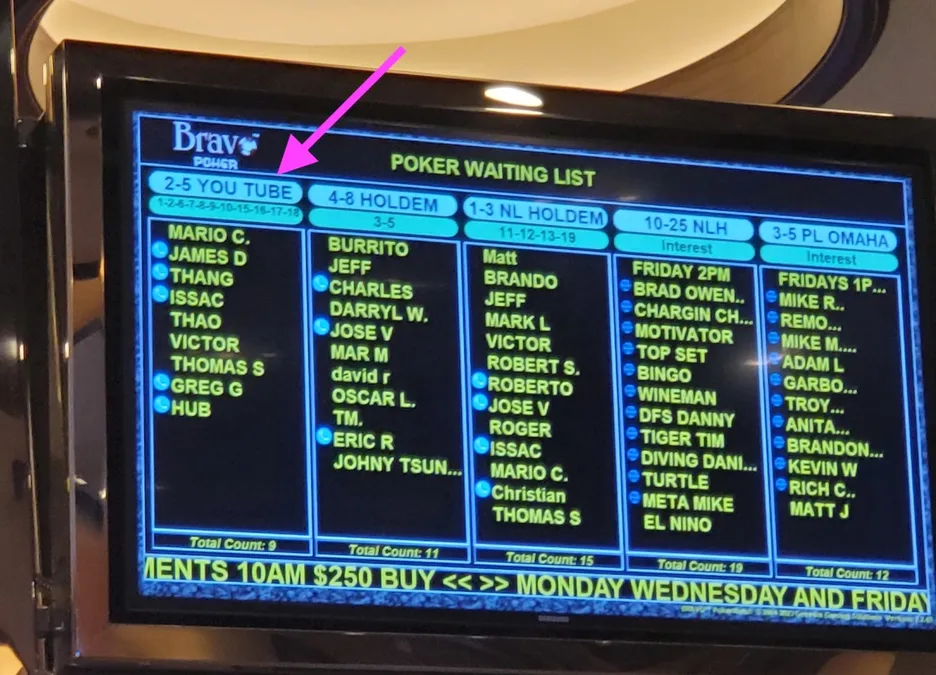
Observed: Five vertical game columns, stakes and custom game titles, table numbers, names, interest lists, total counts, and a promotional footer. Colored dots appear without a visible legend; their meaning is unverified.
Takeaway: Predictable columns help players find the same game again. We should preserve that stability even if other content changes. View source.
Game terms above the queue
Open the vendor page's
Game & Waitlist Management image.
View original vendor visual
Observed: Room branding, blue game headers, stakes/type, buy-in, waiting counts, stacked names and table numbers. The TV panel is partially cropped. The page mentions TableCaptain 2, but the screen's version cannot be established.
Takeaway: Buy-in belongs near the stakes, and staff controls do not belong on the public TV. View source.
Ordinary queues and must-move lists
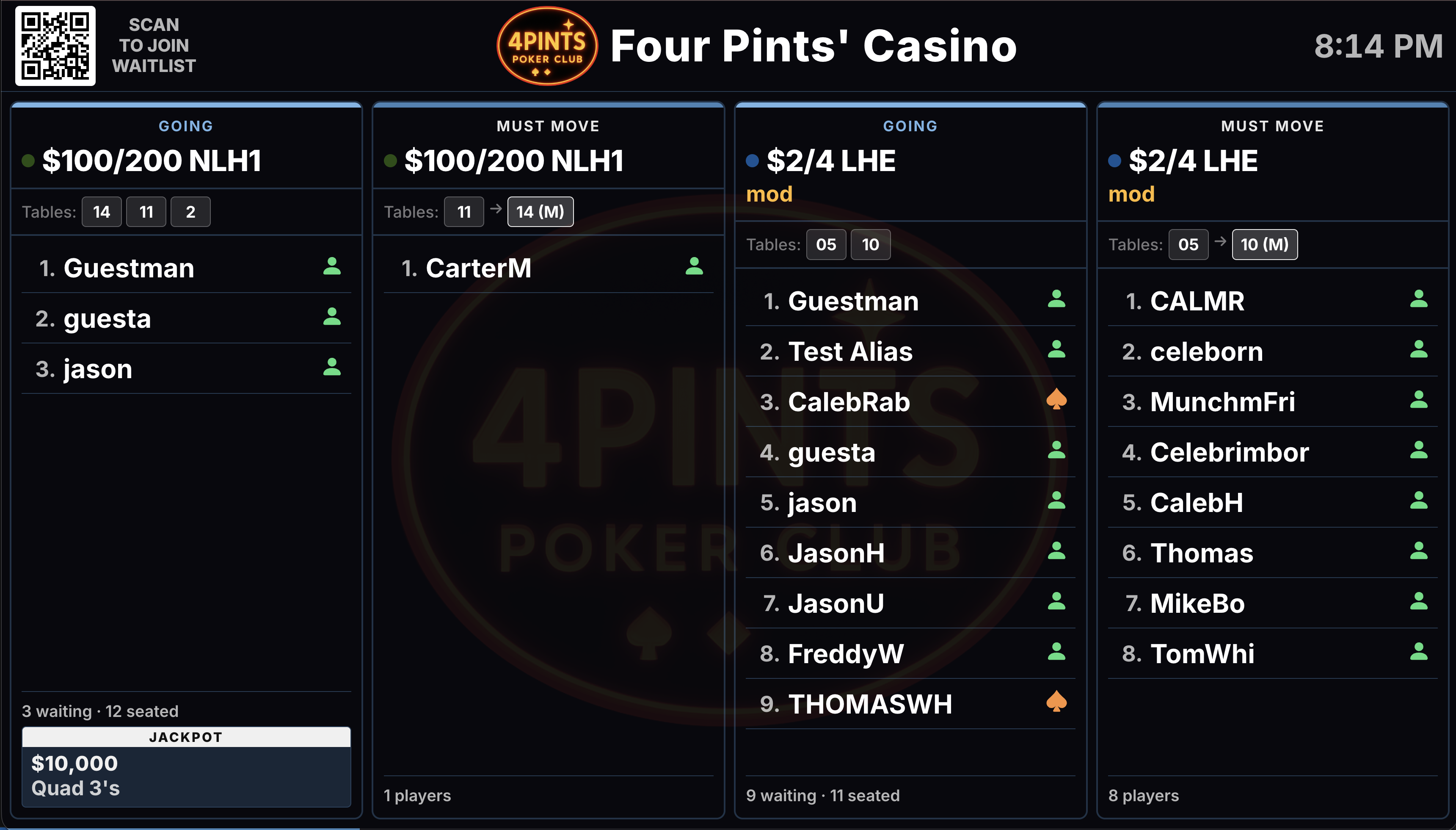
Observed: Separate Going and Must Move columns, table labels and move arrows, numbered aliases, counts, per-game jackpots, clock, room branding and QR signup. Status icons lack a verified legend.
Takeaway: Transfers and must-move lists deserve explicit types. A single undifferentiated queue will not cover every room. View source.
A straightforward bridge to signup

Observed: Three game columns, tables and waiting counts, numbered names, elapsed waiting time, branding/time, and QR signup. The vendor describes signup without an app or account.
Takeaway: A room-specific signup path can reduce podium questions. A QR code must lead to the real supported flow; these concepts do not invent one. View source.
External reference images remain with their publishers and require internet access. The concepts themselves work offline. Sources were checked October 16, 2026. These images are evidence of particular screens, not an exhaustive audit of the products.
Workflow evidence that matters more than styling
- Genesis describes Bravo's live and interest lists and floor notification of seat availability. Interest is a different state from a running game with a wait.
- Golden Nugget's Bravo instructions allow multiple game selections and require podium check-in to activate a player's spot. Arrival state and queue order cannot be inferred from the act of signing up.
- Saracen's January 2026 room policy, pages 3-4, gives checked-in players priority, defines call and arrival limits, and assigns seating and must-moves to staff. These are examples of room-specific rules, not policies to hard-code for all TableMaster rooms.
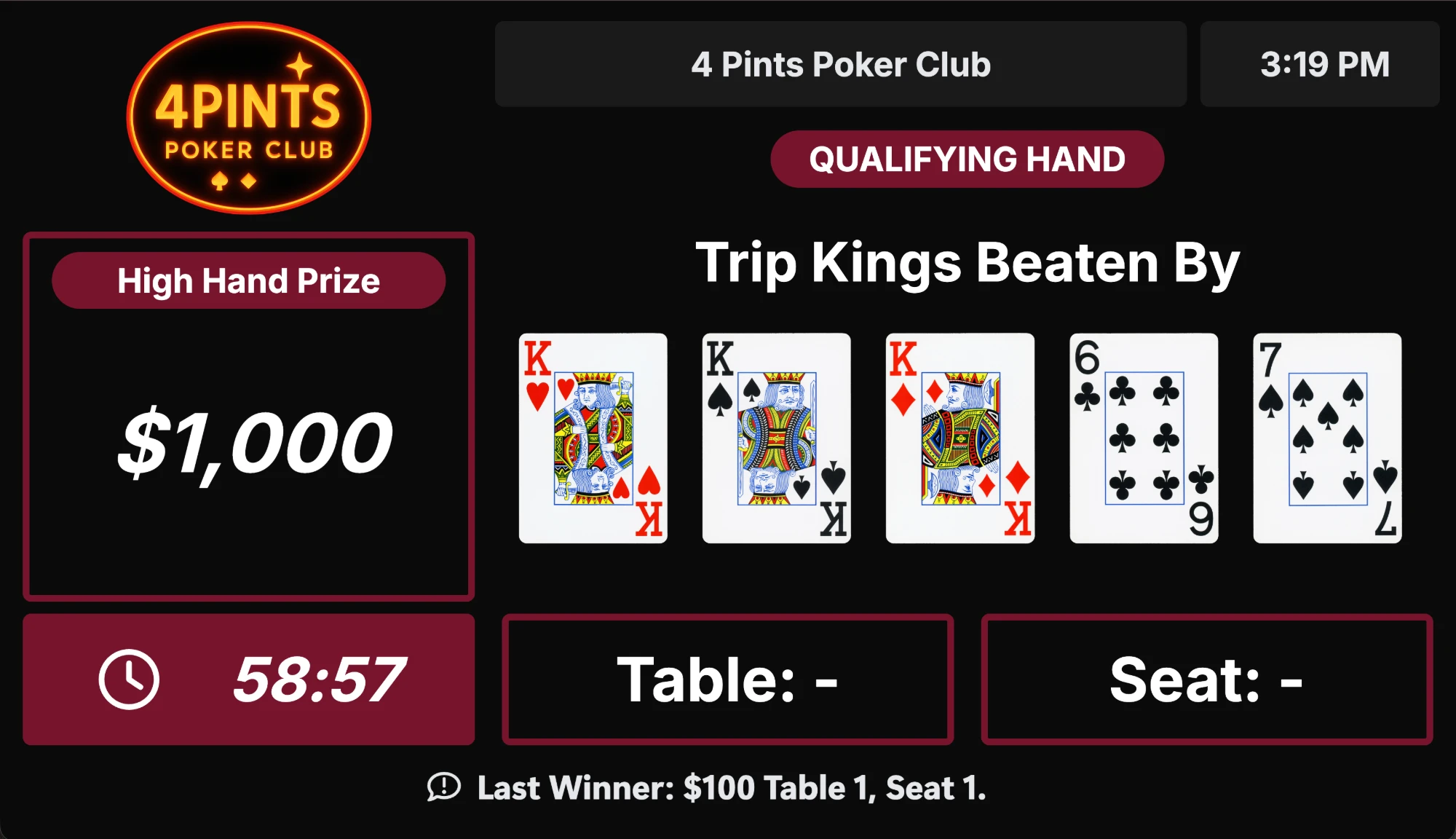
- CardOpz's separate high-hand screen shows prize, qualifying hand, cards, timer, table/seat and previous winner. This supports a dedicated promotion mode when extra screens are available.
- PokerAtlas's app documentation separates live information from online registration, which is available only at certain properties. TableMaster should likewise make actions depend on room support.
We found no comparative evidence proving columns outperform the alternatives, and no verified basis for borrowing a competitor's wait prediction, automatic paging, or offline behavior. Those remain design decisions to validate.
The data foundation exists. The cash TV does not.
The local source review found no cash page type in the shared display renderer. Its existing page union covers tournament, room and leaderboard screens. The room and player apps have useful cash behavior, but those feeds cannot simply be copied into an unattended display. Party-size entries also exist in the public queue contract, so “entries on list” and “players waiting” must be distinguished when a group can occupy more than one seat.
| Area | Current source evidence | Implementation implication |
|---|---|---|
| Shared display | Existing stream rendering, room branding and tournament layouts. No cash renderer/page type found. | Add cash to the shared package and stream editor, then wire both Display and RoomDirector previews. |
| Games and queues | Player-safe game terms, running-table/open-seat counts, waiting/called/interest counts, public aliases, party size and queue position. | Good semantic foundation. Display devices need a purpose-built room-scoped feed with their existing authorization model. |
| Availability | Mobile suppresses “open seats” advertising when waiting_count is above zero. Called-only or reserved-seat cases need further definition. | Preserve that intent and strengthen the TV contract for calls and reservations. Physical vacancy is not a walk-in entitlement. |
| Calls | Called state and called-at time exist; a destination table/seat is not committed before seating. No verified call-expiry or arrival state in the audited public contract. | Initial TV call says “Please see the desk.” Destination, deadline and checked-in labels need explicit feed/workflow support. |
| Interest and specialist modes | Public interest counts exist; interest-list names are not public. No verified public TV feed for high-hand leaders, must-moves or predicted waits. | Show counts for interest. Treat specialist modes as extensions with separate data and room configuration work. |
| Offline behavior | The display conventions require cached rendering and a non-blocking connection notice. | Retain last known lists, visibly age them, and suppress stale calls/current-availability claims. |
Audit checked local checkout and cached remote references on October 16, 2026, without fetching, changing production or querying the live database. Local checkouts were behind some cached remote refs. Exact paths and refs are recorded in the source audit: Display cached origin/main 70919e7, Platform 1c10e30a, Room 012a267 (all dated October 16). Key paths: packages/display-renderer/src/types/displayStream.ts; apps/player-universal/hooks/cash/roomCashGamesQuery.ts; useRoomCashWaitlistPublic.ts; features/cash/cashStakeTerms.ts; Room src/lib/cashGames.ts. This is evidence of implementation shape, not proof of the deployed state.
The default color direction is selected.
Accepted on October 16: Solid header with Color set A. Rooms choose each game’s color from the existing six-color tournament palette. Save that choice with the room’s game definition and use it consistently across queue pages, TV assignments and the directory.
Recommended next step: review the revised footer in the no-call, announcement, and three-call scenarios, then check the chosen design on an actual room TV. The lower-right QR is selected; room-aware routing remains an accepted requirement that needs implementation and signed-device testing.
The interactive design refinement is complete. Production renderer/feed integration, actual device assignment, physical-TV legibility, and operational failure recovery remain separate work. This artifact uses illustrative data and changes no room settings.